GitProxy Architecture
This guide explains GitProxy's various components, and how they communicate with each other when performing a git push.
As mentioned in the README, GitProxy is an application that intercepts pushes and applies rules/policies to ensure they're compliant. Although a number of policies are available by default, these can be extended by using plugins.
Overview
GitProxy has several main components:
- HTTP Proxy Express app (
/src/proxy): The actual proxy server for Git. Git operations performed by users are intercepted here, processed by various Express middleware (such as URL rewriting) and applies the relevant chain of actions to the payload. Customized functionality in the form of plugins are inserted and added to this chain as well.- Chain: A set of processors that are applied to an action (i.e. a
git pushoperation) before requesting review from a user with permission to approve pushes - Processor: AKA
Step. A specific step in the chain where certain rules are applied. See the list of default processors for more details.` - Plugin: A custom processor that can be added externally to extend GitProxy's default policies. See the plugin guide for more details.
- Chain: A set of processors that are applied to an action (i.e. a
- Backend-for-frontend (BFF) Service API, Express app (
/src/service): Handles UI requests, user authentication to GitProxy (not to Git), database operations and some of the logic for rejection/approval. Runs by default on port8080, and can be configured with theGIT_PROXY_UI_HOSTandGIT_PROXY_UI_PORTenvironment variables.- Passport: The library used to authenticate to the GitProxy API (not the proxy itself - this depends on the Git
user.email). Supports multiple authentication methods by default (Local, AD, OIDC). - Routes: All the API endpoints used by the UI and proxy to perform operations and fetch or modify GitProxy's state. Except for custom plugin and processor development, there is no need for users or GitProxy administrators to interact with the API directly.
- Passport: The library used to authenticate to the GitProxy API (not the proxy itself - this depends on the Git
- Configuration (
/src/config): Loads and validates the configuration fromproxy.config.json, or any provided config file. Allows customising several aspects of GitProxy, including databases, authentication methods, predefined allowed repositories, commit blocking rules and more. For a full list of configurable parameters, check the config file schema reference. - Web UI, React (
/src/ui): Allows user-friendly interactions with the application. Shows the list of pushes requiring approval, the list of repositories that users can contribute to, and more. Also allows users to easily review the changes in a push, and approve or reject it manually according to company policy.
Diagram
These are all the core components in the project, along with some basic user interactions:
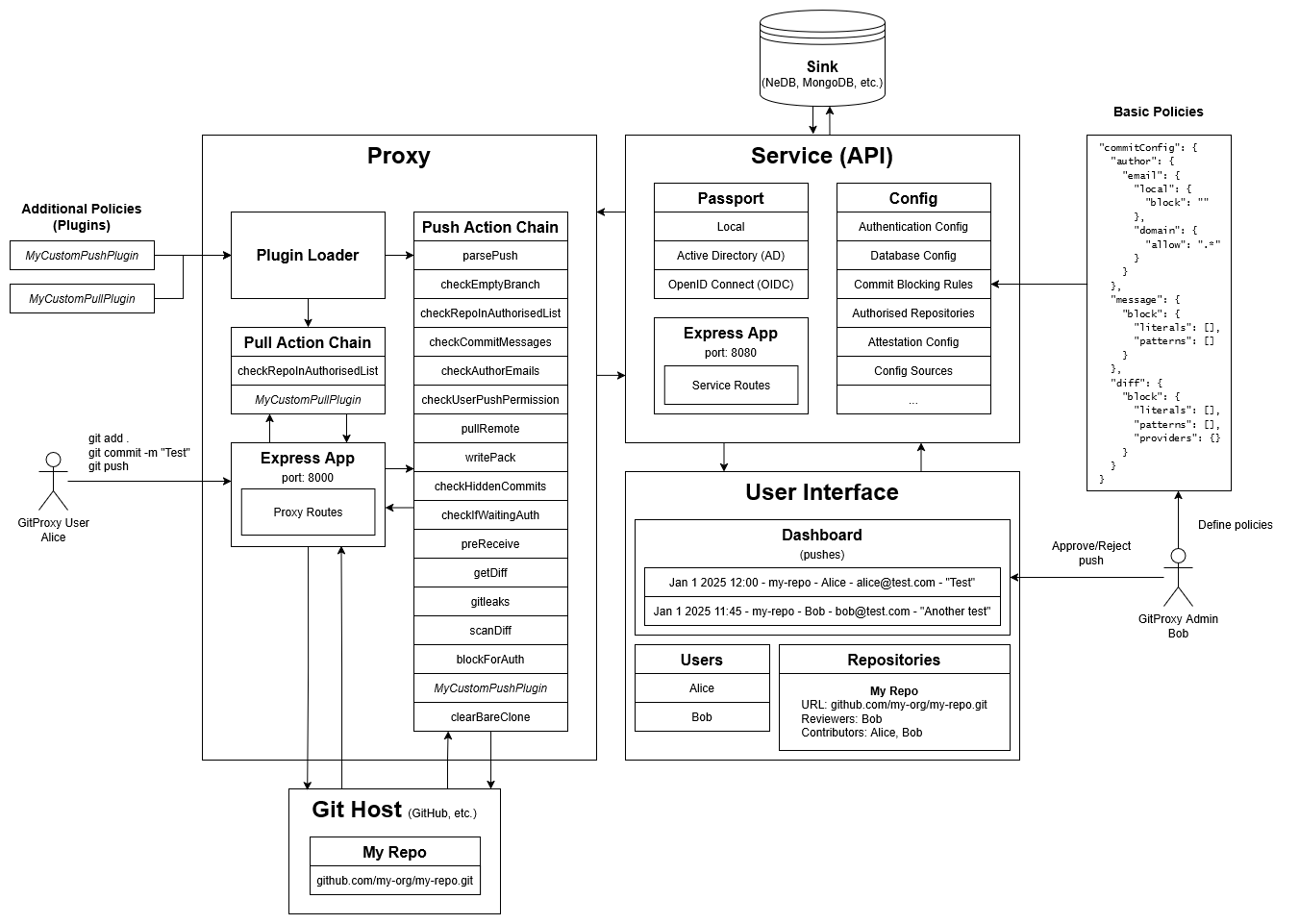
Pushing to GitProxy
- Alice (contributor) sets the GitProxy server as their Git remote
- Alice commits and pushes something to the proxy remote
- The Proxy module intercepts the request, and applies the Push Action Chain to process it
- The push goes through each step in the chain and either gets rejected, or gets added to the list of pushes pending approval
- Bob (admin/approver) reviews the push to ensure it complies with policy (attestation), and approves/rejects it
- If approved, Alice can push once again to update the actual remote in the Git host. If rejected, the push will be marked as "rejected", and Alice must fix the conflicting commit/changes and push again for re-approval
Approving/Rejecting a push
- Alice makes a push
- Bob (approver) logs into his GitProxy account through the UI
- Bob sees the push on the dashboard, pending review
- Bob can review the changes made (diff), commit messages and other push info
- Before approving/rejecting, Bob must review the attestation (list of questions about company policy) and check all the boxes
- Bob can approve the push, allowing Alice to push again (to the actual remote), or reject the push and optionally provide a reason for rejection
Defining Policies
Three types of policies can be applied to incoming pushes:
- Default policies: These are already present in the GitProxy pull/push chain and require modifying source code to change their behaviour.
- For example,
checkUserPushPermissionwhich simply checks if the pusher's email exists in the GitProxy database, and if their user is marked in the "Contributors" list (canPush) for the repository they're trying to push to.
- For example,
- Configurable policies: These are policies that can be easily configured through the GitProxy config (
proxy.config.jsonor a custom file).- For example,
checkCommitMessageswhich reads the configuration and matches the string patterns provided with the commit messages in the push in order to block it.
- For example,
- Custom policies:
- Plugins: Push/pull plugins provide more flexibility for implementing an organization's rules. For more information, see the guide on writing your own plugins.
- Processors: Custom logic may require specific data within a push that isn't available at the end of the chain (where plugins are executed). In this case, the appropriate solution is to write a processor and add it to the correct place in the chain.
The nitty gritty
Pre-processors
Pre-processors run before executing the chain. Currently, only executes parseAction, which is in charge of classifying requests as push/pull/default and creating the Action object used by the chain.
Action Chains
Action chains are a list of processors that a Git operation goes through before awaiting approval. Three action chains are currently available:
Push action chain
Executed when a user makes a git push to GitProxy. These are the actions in pushActionChain, by order of execution:
parsePushcheckEmptyBranchcheckRepoInAuthorisedListcheckCommitMessagescheckAuthorEmailscheckUserPushPermissionpullRemotewritePackcheckHiddenCommitscheckIfWaitingAuthpreReceivegetDiffgitleaksscanDiffblockForAuth
Pull action chain
Executed when a user makes a git clone or git pull to GitProxy:
At present, the pull action chain is only checking that the repository is configured in GitProxy. This ensures it will block pull requests for unknown repositories.
Default action chain
This chain is executed when making any operation other than a git push or git pull.
The default action chain, much like the pull chain, is only checking that the repository is configured in GitProxy. This ensures it will block all git client requests for unknown repositories.
Post-processors
After processors in the chain are done executing, audit is called to store the action along with all of its execution steps in the database for auditing purposes.
If pullRemote ran successfully and cloned the repository, then clearBareClone is run to clear up that clone, freeing disk space and ensuring that the .remote/* folder created does not conflict with any future pushes involving the same SHA.
Finally, if the action was auto-approved or auto-rejected as a result of running preReceive, it will attempt to auto-approve or auto-reject it.
Authentication
Currently, three different authentication methods are provided for interacting with the UI and adding users. This can be configured by editing the authentication array in proxy.config.json.
Local
Default username/password auth method. Note that this authentication method does not allow adding users directly from the UI (/api/auth/create-user must be used instead).
Default accounts are provided for testing:
- Admin: Username:
admin, Password:admin - User: Username:
user, Password:user
ActiveDirectory
Allows AD authentication and user management. The following parameters must be configured in proxy.config.json, and enabled must be set to true:
{
  "type": "ActiveDirectory",
  "enabled": false,
  "adminGroup": "",
  "userGroup": "",
  "domain": "",
  "adConfig": {
    "url": "",
    "baseDN": "",
    "searchBase": "",
    "username": "",
    "password": ""
  }
}
OpenID Connect
Allows authenticating to OIDC. The following parameters must be configured in proxy.config.json, and enabled must be set to true:
{
  "type": "openidconnect",
  "enabled": false,
  "oidcConfig": {
    "issuer": "",
    "clientID": "",
    "clientSecret": "",
    "callbackURL": "",
    "scope": ""
  }
}
When logging in for the first time, this will create a GitProxy user with the same email associated to the OIDC provider. The username will be set to the local portion of the email.
For example: logging in with myusername@mymail.com will create a new user with username set to myusername.
Adding new methods
New methods can be added by:
- Extending
/src/service/passportwith the relevant passport.js strategy.- The strategy file must have a
configuremethod and atypestring to match with the config method. See the pre-existing methods in/src/service/passportfor more details.
- The strategy file must have a
- Creating a
proxy.config.jsonentry with the required configuration parameters - Importing the new strategy and adding it to the
authStrategiesarray in/src/service/passport/index.ts
GitProxy Configuration
Many of the proxy, API and UI behaviours are configurable. The most important ones will be covered here. For a comprehensive list of parameters, see the config file schema reference.
GitProxy ships with a default configuration which can be customised in various ways. See the configuration guide for more details on providing custom config files and validating them.
Config parameters
cookieSecret
This is the secret that is passed in to express-session for signing the session ID cookie for the GitProxy API Express app (not the proxy itself).
As per their documentation:
This is the secret used to sign the session ID cookie. The secret can be any type of value that is supported by Node.js
crypto.createHmac(like a string or a Buffer). This can be either a single secret, or an array of multiple secrets. If an array of secrets is provided, only the first element will be used to sign the session ID cookie, while all the elements will be considered when verifying the signature in requests. The secret itself should be not easily parsed by a human and would best be a random set of characters.A best practice may include:
- The use of environment variables to store the secret, ensuring the secret itself does not exist in your repository.
- Periodic updates of the secret, while ensuring the previous secret is in the array.
Using a secret that cannot be guessed will reduce the ability to hijack a session to only guessing the session ID (as determined by the
genidoption).Changing the secret value will invalidate all existing sessions. In order to rotate the secret without invalidating sessions, provide an array of secrets, with the new secret as first element of the array, and including previous secrets as the later elements.
Note HMAC-256 is used to sign the session ID. For this reason, the secret should contain at least 32 bytes of entropy.
sessionMaxAgeHours
Specifies the number of hours to use when calculating the Expires Set-Cookie attribute for the GitProxy API (not the proxy itself).
Default: 12
api
Allows defining and configuring third-party APIs.
Currently supports the following out-of-the-box:
- ActiveDirectory auth configuration for querying via a REST API rather than LDAP
- Gitleaks configuration
commitConfig
Used in checkCommitMessages, checkAuthorEmails and scanDiff processors to block pushes depending on the given rules.
By default, no rules are applied.
These are some sample values for allowing commits associated to one's own company/organization, and blocking commits containing sensitive information such as AWS tokens or SSH private keys:
"commitConfig": {
  "author": {
    "email": {
      "local": {
        "block": "(test|noreply|do-not-reply)"
      },
      "domain": {
        "allow": "(mycompany\\.com|myorg\\.io)$"
      }
    }
  },
  "message": {
    "block": {
      "literals": [
        "password",
        "secret",
        "TODO",
      ],
      "patterns": [
        "AKIA[0-9A-Z]{16}",
        "postgresql://[^\\s]+:[^\\s]+@",
        "mongodb://[^\\s]+:[^\\s]+@",
      ]
    }
  },
  "diff": {
    "block": {
      "literals": [
        "DEBUG_MODE=true",
        "-----BEGIN PRIVATE KEY-----",
        "-----BEGIN RSA PRIVATE KEY-----"
      ],
      "patterns": [
        "AKIA[0-9A-Z]{16}",
      ],
      "providers": {
        "AWS Access Key": "AKIA[0-9A-Z]{16}",
        "GitHub Token": "ghp_[a-zA-Z0-9]{36}",
        "Google API Key": "AIza[0-9A-Za-z\\-_]{35}",
        "JWT Token": "eyJ[a-zA-Z0-9_-]*\\.[a-zA-Z0-9_-]*\\.[a-zA-Z0-9_-]*",
        "Private Key Pattern": "-----BEGIN (RSA |EC |DSA )?PRIVATE KEY-----"
      }
    }
  }
}
attestationConfig
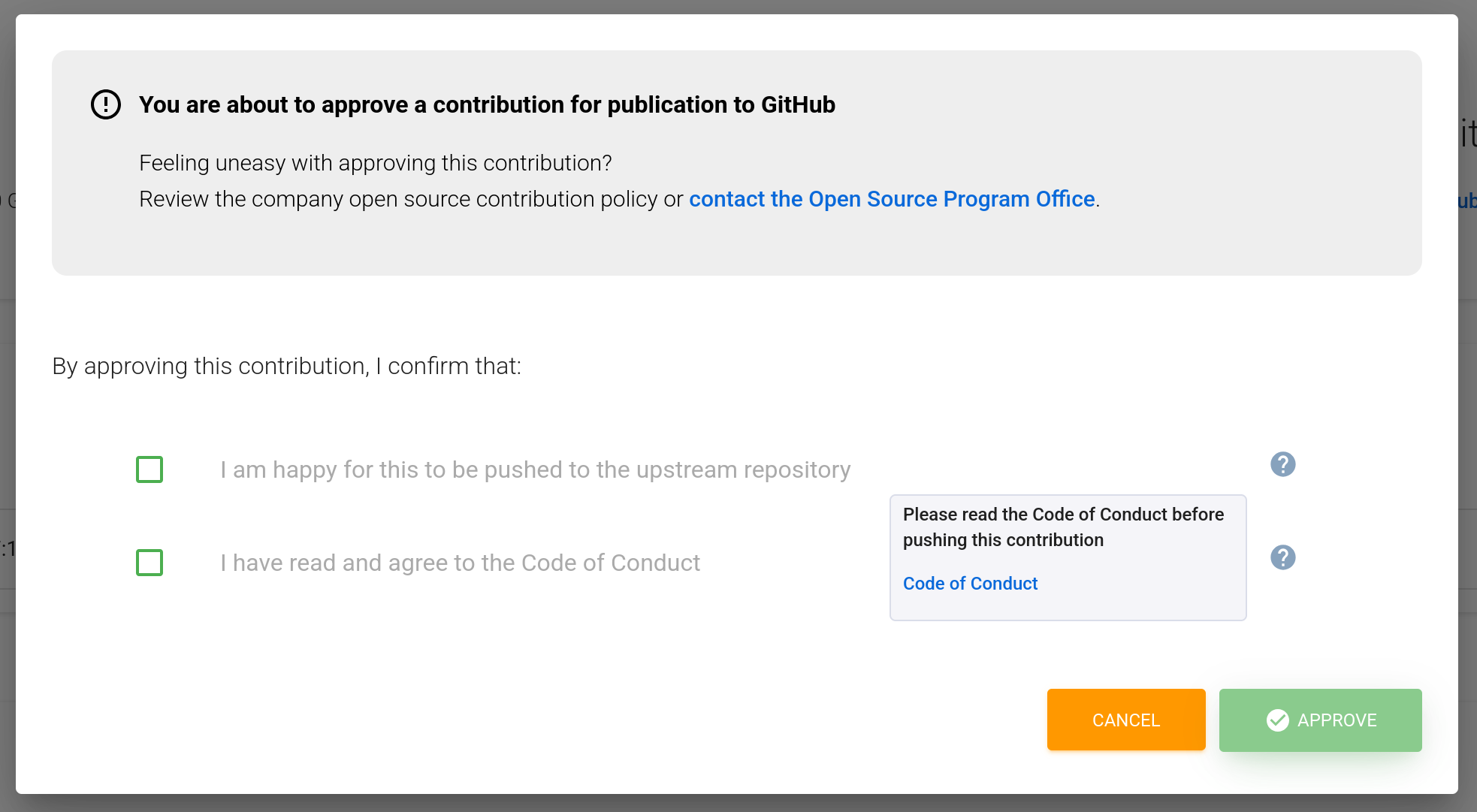
Allows configuring the attestation form displayed to reviewers. Reviewers must check each box to complete the review.
Has a list of questions, each of which can be configured with a label and a tooltip with various links:
"attestationConfig": {
  "questions": [
    {
      "label": "I am happy for this to be pushed to the upstream repository",
      "tooltip": {
        "text": "Are you happy for this contribution to be pushed upstream?",
        "links": []
      }
    },
    {
      "label": "I have read and agree to the Code of Conduct",
      "tooltip": {
        "text": "Please read the Code of Conduct before approving this contribution.",
        "links": [{
          "text": "Code of Conduct",
          "url": "https://www.finos.org/code-of-conduct"
        }]
      }
    }
  ]
}
Given the previous configuration, the attestation prompt would look like this:
domains
Allows setting custom URLs for GitProxy interfaces in case these cannot be determined.
This parameter is used in /src/service/urls.ts to override URLs for the proxy (default: http://localhost:8000) and service (default: http://localhost:8080).
Sample configuration:
"domains": {
  "proxy": "https://git-proxy.mydomain.com",
  "service": "https://git-proxy-api.mydomain.com"
}
rateLimit
Defines the rate limiting parameters (via express-rate-limit) for the GitProxy API (not the proxy).
Sample values:
"rateLimit": {
  "windowMs": 60000,
  "limit": 150
}
This will limit the number of requests made to the API to 150 per minute.
Optionally, a statusCode and a message can be specified to override the default responses.
privateOrganizations (deprecated)
Formerly used to block organizations, replaced by commitConfig.diff.block.providers.
urlShortener
Currently unused.
contactEmail
Sets the contact email for the Open Source Program Office (or equivalent organisational contact) in the attestation form:
csrfProtection
Enables lusca (Cross-Site Request Forgery protection) for the API. This prevents third-party services from making requests to the API without proper CSRF token handling.
For example, the Cypress UI tests need to call getCSRFToken before making requests:
Cypress.Commands.add('getCSRFToken', () => {
  return cy.request('GET', 'http://localhost:8080/api/v1/repo').then((res) => {
    let cookies = res.headers['set-cookie'];

    if (typeof cookies === 'string') {
      cookies = [cookies];
    }

    if (!cookies) {
      throw new Error('No cookies found in response');
    }

    const csrfCookie = cookies.find((c) => c.startsWith('csrf='));
    if (!csrfCookie) {
      throw new Error('No CSRF cookie found in response headers');
    }

    const token = csrfCookie.split('=')[1].split(';')[0];
    return cy.wrap(decodeURIComponent(token));
  });
});
plugins
Defines a list of plugins to integrate on GitProxy's push or pull actions. Accepted values are either a file path or a module name.
See the plugin guide for more setup details.
authorisedList
Defines a initial list of repositories that are allowed to be pushed to through the proxy. Note that repositories can also be added through the UI, API or by manually editing the database.
Sample values:
"authorisedList": [
  {
    "project": "my-organization",
    "name": "my-repo",
    "url": "https://github.com/my-organization/my-repo.git",
  }
]
sink
List of database sources. The first source with enabled set to true will be used. Currently, MongoDB and filesystem databases (NeDB) are supported. By default, the filesystem database is used.
Each entry has its own unique configuration parameters.
Extending GitProxy to support other databases requires adding the relevant handlers and setup to the /src/db directory. Feel free to open an issue requesting support for any specific databases - or open a PR with the desired changes!
authentication
List of authentication methods. See the authentication section for more details.
tempPassword
Currently unused.
apiAuthentication
Allows defining ways to authenticate to the API. This is useful for securing custom/automated solutions that rely on the GitProxy API, as well as adding an extra layer of security for the UI.
If apiAuthentication is left empty, API endpoints will be publicly accesible.
Currently, only JWT auth is supported. This is implemented via the jwtAuthHandler middleware. Aside of validating incoming access tokens, it can also assign roles based on the token payload.
Setting up JWT Authentication
When JWT authentication is enabled, all requests to the API must provide a valid JWT access token in the UI. This can be set in the settings tab.
If no token, or an invalid/expired token is sent, requests will fail with a 401 Unauthorized response.
The JWT auth configuration looks like this:
{
  "type": "jwt",
  "enabled": true,
  "jwtConfig": {
    "authorityURL": "https://accounts.google.com",
    "clientID": "my-client-id.apps.googleusercontent.com",
    "expectedAudience": "https://accounts.google.com",
    "roleMapping": {
      "admin": {
        "name": "John Doe"
      }
    }
  }
}
authorityURL must point to an OIDC issuer. This URL is used to fetch signing keys and to verify the token’s issuer. If this value is missing, the server will return a 500 error.
clientID is required and used for token validation. If not configured, requests will fail with a server error.
expectedAudience defines which audience (aud claim) the token must contain. When not explicitly set, the middleware falls back to using the clientID as expected audience. Tokens issued for a different audience will be rejected, even if they are otherwise valid.
If the JWT cannot be verified, is expired, or doesn't match the expected issuer or audience, the API responds with 401 Unauthorized.
Role Mapping
After a token is successfully validated, role assignment is done based on roleMapping. The decoded JWT payload is matched against these rules. Roles will be assigned when a key-value pair in the claims matches the ones in the configuration. These roles are then assigned to the Request.user value.
For example, to assign req.admin to users whose name matches "John Doe":
"roleMapping": {
  "admin": {
    "name": "John Doe",
  }
}
Errors
If JWT authentication is enabled, requests may fail for various reasons, including:
- Missing JWT token (must set token in UI Settings page)
- Invalid or expired token
- Mismatched issuer or audience
- Missing required configuration in
proxy.config.json
To solve most of these, check that GitProxy's JWT configuration is correct, and that the user has set a valid JWT in the UI Settings page.
tls
Allows configuring TLS (Transport Layer Security) for the proxy (not for the API):
"tls": {
  "enabled": true,
  "key": "certs/key.pem",
  "cert": "certs/cert.pem"
}
configurationSources
Allows setting custom sources for configuring GitProxy. Configuration can be customised through files, HTTP or Git servers.
Furthermore, configuration can be reloaded periodically or merged from multiple sources.
Sample values:
"configurationSources": {
  "enabled": true,
  "reloadIntervalSeconds": 60,
  "merge": true,
  "sources": [
    {
      "type": "file",
      "enabled": true,
      "path": "./external-config.json"
    },
    {
      "type": "http",
      "enabled": true,
      "url": "http://config-service.com/git-proxy-config",
      "headers": {},
      "auth": {
        "type": "bearer",
        "token": ""
      }
    },
    {
      "type": "git",
      "enabled": true,
      "repository": "https://git-server.com/project/git-proxy-config",
      "branch": "main",
      "path": "git-proxy/config.json",
      "auth": {
        "type": "ssh",
        "privateKeyPath": "/path/to/.ssh/id_rsa"
      }
    }
  ]
},
uiRouteAuth
Allows defining which UI routes require authentication to access. Rules are set through URL patterns, and can be set to require a logged-in user or an admin to access.
If the default values are set to enabled: true, any routes matching /dashboard/* will require login, and any routes matching /admin/* will require a logged-in admin user:
"uiRouteAuth": {
  "enabled": true,
  "rules": [
    {
      "pattern": "/dashboard/*",
      "adminOnly": false,
      "loginRequired": true
    },
    {
      "pattern": "/admin/*",
      "adminOnly": true,
      "loginRequired": true
    }
  ]
}
When the constraints are not met, the user will be redirected to the login page or a 401 Unauthorized page will be shown.
Suggestions?
If you have suggestions to improve this guide or fill in missing details, feel free to raise an issue or open a PR with the desired changes.